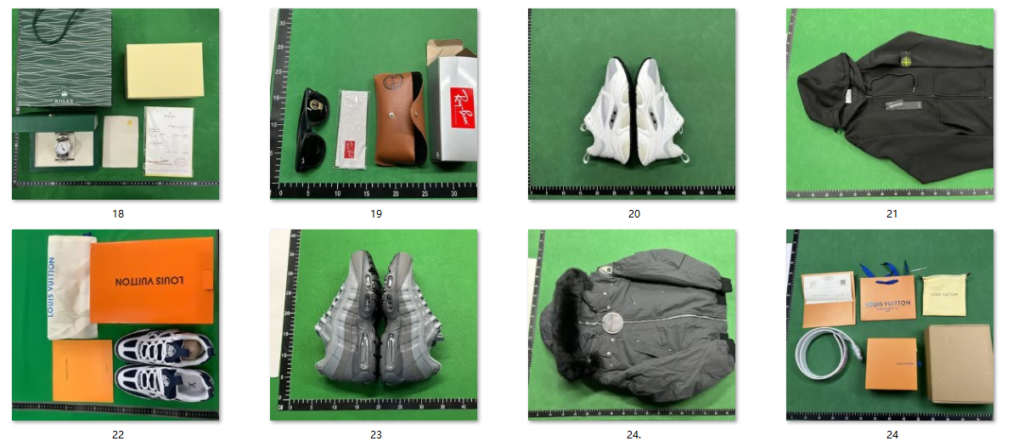
Quality-control pictures are the single biggest advantage of buying through an international shopping agent. The Hoobuy QC finder lets you see real photos of the exact unit before it leaves the warehouse—a critical safety net you do not get on traditional retail platforms. If you want to avoid receiving flawed batches or incorrect sizes, mastering this system is vital.
This guide will explain what the lookup tool does, how to analyze your warehouse warehouse pictures, and how to use these references to secure high-quality hauls.
Table of Contents
What the Hoobuy QC Finder Does
Every single unit that arrives at the central processing facility gets photographed from multiple angles. Those inspection photos are indexed transparently by product link.
When you utilize the Hoobuy QC finder, the tool effectively becomes a batch-quality lookup database. By pasting a product SKU or shop link from a curated best Hoobuy spreadsheet , you can look up exactly how that specific batch turned out for previous buyers before you even submit your payment.
What to Check in Every QC Photo
When analyzing pictures inside the Hoobuy QC finder dashboard, do not just glance at the item. Be methodical and inspect these five key details carefully:
-
Logo alignment: Ensure logos are centered, correctly spaced, and free of smudging or bleeding prints.
-
Stitching quality: Look for even threads, loose ends, or skipped stitches along the main panels.
-
Colour accuracy: Compare the shade against retail images, keeping in mind harsh warehouse lighting can distort colors slightly.
-
Material texture: Look closely at the leather grain, mesh weave, and rubber sole details to ensure they match factory promises.
-
Labels & tags: Check the box text, care label, size tag, and serial codes. Correct fonts and spacing matter most.
How to Cross-Reference the Product Sheet
Top-tier shopping catalogs include factory batch tags such as “VT”, “PK”, “LW”, or “GX”. When your warehouse photos arrive, your main job is to compare your unit against reference images from the exact same batch.
If the community reports that a specific factory has better materials or fewer flaws, that is where you should be spending your money. Before you finalize your order, it is also smart to review a broader How to Use a Hoobuy Spreadsheet tutorial to ensure you are selecting the correct batch variations from the start.
Step-by-Step: Rejecting a Flawed Item
If you spot a noticeable defect or realize the seller shipped the wrong batch, do not panic. The platform allows you to request a domestic return or exchange easily through your dashboard. Follow these simple steps:
-
Take Screenshots: Highlight the specific defect area clearly.
-
Open a Return Request: Navigate to your ordered items tab and select the flawed item.
-
Upload Proof: Attach your marked screenshots and write a brief note for your buyer.
-
Monitor Status: Check the Official Hoobuy Platform regularly to see if the seller has accepted the return.
Do not approve a flawed item just to avoid delays—shipping a bad unit internationally means paying heavy postage fees twice.
When to Approve and Ship Your Haul
If the item matches your expectations, the logos are aligned, and the batch tags are correct, you can safely click the approval button. The item will be moved to your long-term storage locker.
Once you have approved multiple items using the Hoobuy QC finder, you can combine them into a single parcel to save money on international shipping rates.
Frequently Asked Questions (FAQ)
Is the Hoobuy QC finder free to use?
Yes, checking previously uploaded warehouse photos and viewing your own item’s quality control pictures is a completely free service provided by the agent platform to ensure buyer safety.
How long do I have to reject an item after photos arrive?
Most sellers offer a 7-day domestic return window starting from the day the item arrives at the warehouse. It is highly recommended to inspect your photos within 24 to 48 hours to ensure you do not miss the return deadline.